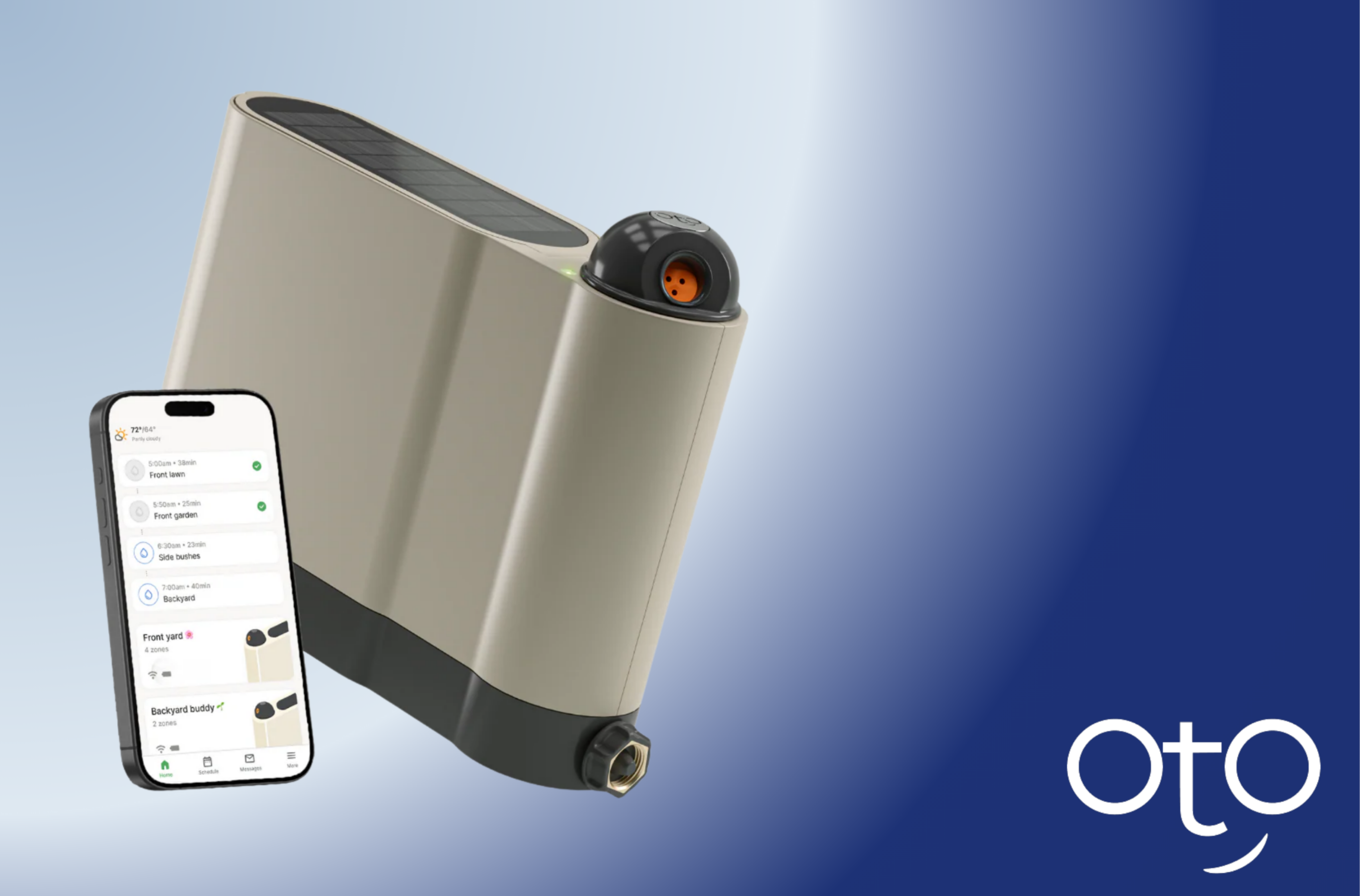
The Future of Lawn Care: How Smart Irrigation Saves Water and Money
By John Mike
Published on 2026-02-13 13:48:00
Residential water usage is a growing concern for homeowners and municipalities alike. A significant portion of this water is dedicated to outdoor landscaping, yet much of it goes to waste due to inefficient watering methods. Outdated sprinkler systems and manual watering often lead to runoff, evaporation, and unhealthy lawns. The solution lies in a more intelligent approach: smart irrigation. This technology is reshaping how we care for our yards, offering a path to a lush, beautiful landscape that is also sustainable.
This guide will explain the core principles of smart irrigation and how it addresses common lawn care challenges. We will explore how this technology not only conserves a precious resource but also saves you money and time. By understanding how devices like the OtO smart sprinkler work, you can make an informed decision about upgrading to a more efficient and eco-friendly lawn care system.
The Widespread Problem of Inefficient Watering
Traditional irrigation methods are fundamentally flawed. An old-fashioned oscillating sprinkler attached to a hose, for example, is notoriously imprecise. It throws water in a fixed pattern, soaking sidewalks, driveways, and patios while often missing the corners of your lawn. This leads to an endless cycle of moving the sprinkler and still ending up with dry, brown patches or waterlogged areas.
Conventional in-ground systems, while automated, are not much better. They operate on a simple timer, running for a set duration regardless of recent rainfall or current weather conditions. These systems are "dumb," meaning they cannot adapt to the environment. This lack of intelligence is a primary driver of residential water waste, costing homeowners money and straining local water supplies.
What is Smart Irrigation Technology?
Smart irrigation refers to a new generation of watering systems that use technology to provide plants with the precise amount of water they need. Unlike traditional timers, these systems use real-time data to make intelligent watering decisions. This data can include local weather forecasts, soil moisture levels, and plant types.
There are two main types of smart irrigation controllers:
-
Weather-Based Controllers: These systems use local weather data, such as temperature, humidity, and rainfall, to adjust watering schedules automatically. If it just rained, the system will skip the next cycle. If a heatwave is coming, it might add a brief watering session to cool the soil.
-
Soil Moisture-Based Controllers: These systems use sensors placed in the root zone of the lawn to measure the actual moisture level. They initiate watering only when the soil becomes too dry, ensuring plants are never over- or under-watered.
Advanced devices often combine these technologies to create a comprehensive and highly efficient system.
Key Principles of an Effective Smart Irrigation System
A truly effective smart irrigation system does more than just automate watering. It optimizes the entire process for health, efficiency, and conservation. Here are the core principles that set it apart.
1. Precision Delivery
The first principle is watering only what needs to be watered. Modern systems use advanced nozzle technology to control the spray pattern with incredible accuracy. This allows homeowners to create custom watering zones that match the exact shape of their lawn, garden beds, or shrubbery lines. A device like the OtO smart sprinkler lets users draw these zones directly in an app, ensuring that not a single drop is wasted on concrete or other non-landscaped areas.
2. Data-Driven Scheduling
The second principle is watering at the right time and in the right amount. By connecting to Wi-Fi, a smart system can access hyperlocal weather forecasts. It knows to delay watering if rain is imminent, preventing oversaturation and runoff. This weather-adaptive scheduling is a key component of smart irrigation, as it ensures the lawn receives water based on its actual needs, not a rigid, pre-programmed timer.
3. Zoned Customization
Different plants have different needs. The third principle is the ability to customize watering for different areas of your yard. A robust smart system allows you to create multiple independent zones, each with its own schedule. Your thirsty vegetable garden can receive more frequent watering than your drought-tolerant native grasses. This level of control promotes healthier growth across your entire landscape.
The Sustainability Angle: Conserving Water for a Better Future
The environmental benefits of smart irrigation are significant. The U.S. Environmental Protection Agency (EPA) estimates that as much as 50% of the water we use outdoors is wasted due to inefficient watering methods. By switching to a smart system, the average household can reduce its water use by tens of thousands of gallons annually.
This conversation has a ripple effect. It reduces the strain on municipal water supplies, especially in drought-prone regions. It also lowers the energy required to treat and pump water to homes. As more homeowners adopt these technologies, the collective impact on a community's environmental footprint can be substantial. Adopting a device like OtO is a practical step toward a more sustainable lifestyle.
A Decision Framework: Is Smart Irrigation Right for You?
Upgrading your system is an important decision. Here is a framework to help you determine if a smart system is a good fit for your home.
-
Evaluate Your Current System: Are you currently watering manually with a hose? Do you have an old, inefficient in-ground system? If you are unhappy with the results, cost, or effort involved, it’s time to consider an upgrade.
-
Assess Your Goals: Are you primarily looking to save money on your water bill? Are you motivated by environmental conservation? Or is your main goal the convenience of automation? Smart irrigation addresses all three of these goals effectively.
-
Consider Your Property: Take stock of your yard's size, shape, and Wi-Fi signal strength. Modern hose-connected systems like OtO are designed for DIY installation and are perfect for typical suburban yards. They require a stable Wi-Fi connection to access weather data and receive commands from the app.
Who is Smart Irrigation Best For?
This technology is ideal for a wide range of people:
-
The Eco-Conscious Homeowner: Anyone looking for practical ways to reduce their environmental impact will find tremendous value in the water-saving capabilities of a smart system.
-
The Busy Professional: For those with limited free time, the "set it and forget it" nature of an automated, intelligent system is a game-changer.
-
The Tech-Savvy Gardener: Individuals who enjoy using technology to optimize their home will appreciate the control and data provided by a smart irrigation app.
-
The Budget-Conscious Family: While there is an upfront investment, the long-term savings on water bills make smart irrigation a financially sound decision.
A Wiser Approach to a Greener Lawn
The future of lawn care is not about working harder; it is about watering smarter. Smart irrigation technology offers a powerful solution to the waste and inefficiency of traditional methods. By delivering water with precision, adapting to weather in real time, and providing customizable control, these systems foster healthier landscapes while conserving one of our most vital resources.
For homeowners ready to embrace this future, products like the OtO smart sprinkler provide an accessible and highly effective entry point. Making the switch is an investment in your property, your wallet, and the planet.

Discover how OtO’s smart technology can transform your lawn care routine
Frequently Asked Questions (FAQ)
What is the main difference between a smart sprinkler and a regular sprinkler timer?
A regular sprinkler timer operates on a fixed schedule, watering for the same amount of time every session, regardless of the weather. A smart irrigation system uses real-time weather data and other inputs to automatically adjust the schedule, watering only when and how much is necessary.
How much money can smart irrigation really save?
Savings vary based on climate, water rates, and property size. However, the EPA’s WaterSense program estimates that households with smart irrigation controllers can save nearly 7,600 gallons of water annually, which often translates to significant savings on utility bills.
Are smart irrigation systems difficult to install?
While some systems require professional installation, many new devices are designed for easy DIY setup. Hose-connected systems like OtO can be installed in minutes without any digging or specialized tools, making them very accessible for the average homeowner.
Do I need a strong Wi-Fi signal for a smart sprinkler to work?
Yes, a stable Wi-Fi connection is essential. The device needs to be connected to the internet to download weather data and receive commands from the companion app on your phone.
Can these systems be used for more than just grass?
Absolutely. Advanced systems allow you to create multiple custom zones. This means you can set different watering schedules for your lawn, flower beds, vegetable garden, and shrubs, ensuring each plant type gets the appropriate amount of water.
Sign Up For the Affinora Newsletter
Exclusive product reviews, expert workout tips, and more, delivered to your inbox daily.
By signing up, I agree to the Terms and Privacy Policy.
How DesignFiles Helps Interior Designers Save Time and Boost Profits
By Zayam AR
Published on 2026-02-11 18:32:00
Streamline your interior design business with DesignFiles: manage projects, mood boards, invoices, and clients all in one powerful platform.
You started your interior design business because you have a passion for creating beautiful, functional spaces—not because you love chasing invoices, juggling a dozen different logins, or spending hours formatting product lists. Yet, for many designers, the reality of running a business often overshadows the creative joy of design. If you find yourself buried under administrative tasks while your profit margins stagnate, you aren't alone. The industry is rife with inefficiencies, but the solution isn't to work harder; it's to work smarter with the right tools.
This is where interior design software transforms from a "nice-to-have" into a business necessity. Specifically, DesignFiles has emerged as the industry standard for designers who are serious about scaling. It’s not just a digital drawing board; it is a comprehensive ecosystem designed to reclaim your time and supercharge your revenue. In this guide, we will break down exactly how DesignFiles acts as a force multiplier for your business, helping you cut admin time in half and increase your bottom line.
Save Time with Streamlined Workflows
The biggest enemy of a profitable design business is "context switching." This is the mental energy lost when you jump from a floor planner to an email thread, then to a spreadsheet, and finally to a separate invoicing tool. It fragments your focus and eats up billable hours.
DesignFiles solves this by consolidating all critical functions of your business into a single intuitive dashboard. By centralizing your workflow, you eliminate the friction that slows you down.

Try Now
All-In-One Design Capabilities
Instead of paying for expensive CAD software, a separate mood board creator, and a third tool for rendering, DesignFiles offers robust design features under one roof:
-
- Mood Boards: Create stunning, shoppable mood boards in minutes. The built-in product clipper lets you grab items from any online vendor and drop them directly into your project.
- Floor Plans & 3D Renderings: You don't need to be a tech wizard to produce professional visuals. The software allows you to build 2D floor plans and automatically convert them into photorealistic 3D renderings. This feature alone can save countless hours compared to learning complex architectural software.
- Task Management: Keep your projects on track without leaving the platform. Assign tasks, set deadlines, and monitor progress alongside your designs.
- Mood Boards: Create stunning, shoppable mood boards in minutes. The built-in product clipper lets you grab items from any online vendor and drop them directly into your project.
When all your design assets live in the same place as your project management tools, you stop wasting time hunting for files and start delivering results faster.
Boost Profits with Better Financial Management
Many designers leave money on the table simply because their tracking systems are disorganized. If you are using Excel spreadsheets to track orders and manual invoices to collect payments, you are likely missing out on billable hours and markups. DesignFiles turns financial management into a strategic advantage.
Accurate Profitability Tracking
Knowing your numbers is the difference between a hobby and a thriving business. DesignFiles provides built-in financial reporting that tracks your revenue and profitability in real-time. You can see exactly how much profit you are making on furniture markups versus design fees, allowing you to adjust your pricing model for maximum gain.
Streamlined Invoicing and Payments
Chasing checks is a thing of the past. The platform allows you to generate branded quotes and itemized invoices with a few clicks. Because the invoicing system is integrated with your product specifications, you eliminate the risk of manual data entry errors.
-
- Get Paid Faster: Clients can pay directly online via credit card or ACH. Frictionless payment options mean money lands in your account sooner.
- QuickBooks Integration: For seamless accounting, DesignFiles syncs with QuickBooks, eliminating double-entry and keeping your accountant happy.
- Get Paid Faster: Clients can pay directly online via credit card or ACH. Frictionless payment options mean money lands in your account sooner.
Real-World Impact:
Designers like Stephanie Finucane have reported tripping their profits simply by organizing their business through DesignFiles. When you have clarity on your numbers, you make better business decisions.
Improve Client Satisfaction with Seamless Collaboration
In the high-touch world of luxury service, the client experience is everything. A confusing email chain full of attachments looks unprofessional and leads to misunderstandings. DesignFiles elevates your brand perception through its dedicated Client Portal.
The Client Portal Experience
Imagine giving your clients a single, branded login where they can see everything related to their project. No more digging through inboxes for that one light fixture option you sent three weeks ago.
-
- Interactive Feedback: Clients can leave comments directly on specific items within the mood board or floor plan. They can approve or reject items with a click, giving you immediate clarity on how to proceed.
- Real-Time Notifications: You are alerted the moment a client interacts with a design, allowing you to respond promptly and keep momentum going.
- Status Updates: Clients can track the status of their orders, reducing the "where is my sofa?" texts that disrupt your evenings.
- Interactive Feedback: Clients can leave comments directly on specific items within the mood board or floor plan. They can approve or reject items with a click, giving you immediate clarity on how to proceed.
By using dedicated client collaboration tools, you set professional boundaries while simultaneously offering a transparent, VIP experience. Happy clients who feel heard and organized are the ones who write 5-star reviews and refer their friends.
How DesignFiles Stacks Up Against Alternatives
The market is flooded with design project management tools, but many are piecemeal solutions. Some excel at accounting but lack design features. Others are great for rendering but offer zero project management capabilities.
Here is why DesignFiles stands out as the superior choice for the growth-minded designer:
-
- The "All-in-One" Promise: Unlike competitors that require you to "Zap" different apps together, DesignFiles is truly native. Your invoices talk to your product list, which talks to your mood board. The data flow is seamless.
- Product Clipper Versatility: Some software restricts you to a specific vendor catalog. DesignFiles offers a universal browser clipper, meaning you can source from any vendor on the web and add it to your library instantly. This flexibility is crucial for designers who pride themselves on unique sourcing.
- Learning Curve: Complex architectural software can take months to master. DesignFiles is built for speed and usability, allowing new users to create professional renderings in their first week.
- The "All-in-One" Promise: Unlike competitors that require you to "Zap" different apps together, DesignFiles is truly native. Your invoices talk to your product list, which talks to your mood board. The data flow is seamless.
While generic project management tools like Asana or Trello are powerful, they aren't built for the specific nuances of sourcing furniture, tracking shipments, and visualizing space. You need a tool built by people who understand the interior design industry.
Buying Considerations: What to Look For
If you are still weighing your options, consider these critical factors before committing to a software subscription.
-
- Scalability: Will the software grow with you? You might be a solo-preneur now, but if you plan to hire junior designers or VAs, you need a platform that supports team collaboration and permission settings. DesignFiles is built to scale from solo freelancers to large design firms.
- Customer Support: When a rendering glitches 24 hours before a big presentation, you need help fast. DesignFiles boasts a 4.8/5 rating for customer support, with real humans ready to assist—not just chatbots.
- Cost vs. ROI: Don't just look at the monthly fee; look at the return on investment. If a tool saves you 10 hours of admin work a month and prevents a $500 ordering mistake, it has paid for itself ten times over.
- Client Interface: Remember, you aren't the only one using the software; your clients are too. If the interface is clunky or confusing for them, it reflects poorly on your brand. Always choose software with a polished, user-friendly client portal.
- Scalability: Will the software grow with you? You might be a solo-preneur now, but if you plan to hire junior designers or VAs, you need a platform that supports team collaboration and permission settings. DesignFiles is built to scale from solo freelancers to large design firms.

Try Now
Stop Scrambling, Start Scaling
The difference between a stressed-out designer and a successful CEO often comes down to systems. You cannot scale chaos. To grow your revenue to six figures and beyond, you need a foundation that supports volume without sacrificing quality.
DesignFiles offers that foundation. It replaces the chaos of spreadsheets and scattered emails with a streamlined, professional hub that handles the heavy lifting for you. By automating the mundane and organizing the complex, you free yourself to do what you do best: design.
Are you ready to stop working harder and start building a more profitable business?
Join the 6,000+ designers who have transformed their workflows.